
Home / Security and privacy
Security and privacy
Built to be harder to attack, and honest about the limits.
A security system that is itself easy to attack is a bad trade. Here is how Pioneer is designed, in plain language, with the limits stated up front.
Six design rules.
Video stays in your building
Event clips and footage live on equipment you own. There is no Pioneer cloud account that holds your footage, and no vendor database of your hallways.
Cameras are not exposed
We do not forward camera ports to the internet and we do not run a public camera website. During setup we check for forwarded ports and cloud dashboards that were left on.
Remote access uses keys
For remote support, we set up keyed remote access at install that works only from a few named devices, not a shared password. Remove a device and its access ends. Staff sign in with two-factor if you turn it on, and the dashboard can run over HTTPS.
Four separate network zones
Students and guests, staff, cameras and doors, and management are kept apart by default, so a student phone cannot reach a camera.
Encrypted backups
Backups are encrypted by default, with a second copy off the closet, so a failed disk or a closet incident does not erase your setup. An optional audit log can also be shipped off the box.
Least access
Staff use the dashboard on site. Remote access is for Pioneer's checks and updates, not for everyday viewing.
Why local matters
Fewer doors in.
When camera systems live in a vendor's cloud, one stolen login can show a stranger live views of your building. When the system lives on your own network and is not open to the internet, there is simply less to steal.
The cloud is not always the weak point. Campuses have students who can probe a network, and closets have keys. That is why the design also assumes an attacker may already be inside, and keeps zones apart.
Where the limits are
What we cannot promise.
- We cannot promise the system can never be broken into. No honest provider can. We aim for harder to attack.
- A person with a key, or physical access to the closet, is a risk that never reaches zero.
- Your own staff passwords and your own phishing exposure are still your risk. We can help reduce it, not remove it.
- Network separation and hardening are done by us at install using a written checklist. Pioneer tracks the work and does not change your firewall by itself.
Student data
What Pioneer does and does not touch.
- Pioneer does not connect to your student information system.
- Pioneer handles cameras, doors, alerts and the network around them.
- We design to keep student records out of the security system and video on site.
- We do not claim FERPA certification, and no product alone makes a district compliant.
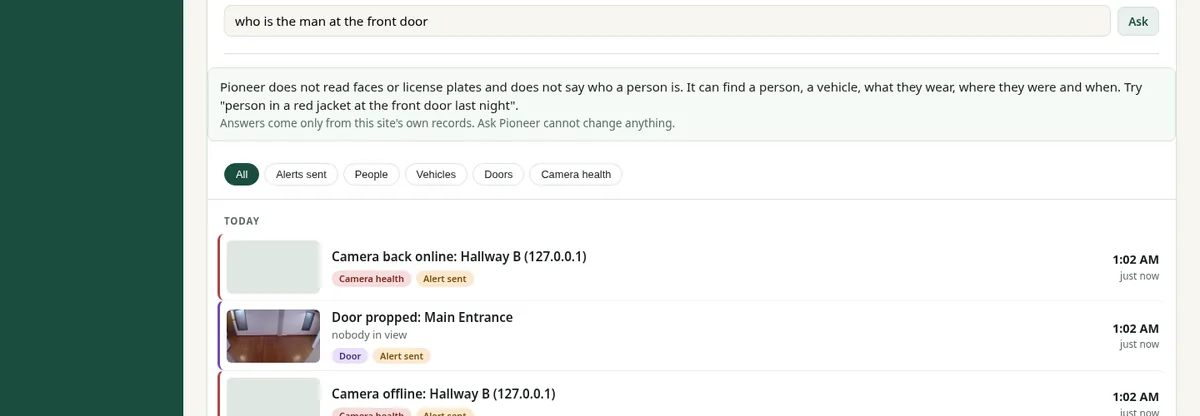
- Pioneer does not read faces or license plates.
Reporting an issue
Found a problem?
If you believe you have found a security issue with this website or with Pioneer, please email [email protected]. We will acknowledge it and not pursue good-faith reports. Our security.txt has the details.
This website's forms collect only what you type in. See the privacy policy.
See it on a setup like yours
Book a short demo, or send us what you run today and we will map it. No pressure and no pitch deck.